AI Agents Taking Jobs? Guide to 5 Tasks Companies Automate
As AI task automation expands, we keep hearing that artificial intelligence will take people’s jobs.
AI is moving beyond tools like ChatGPT that answer questions. Now, AI agents can connect and carry out multiple tasks.
So what work are companies actually handing over to AI?
Are entire occupations about to disappear, or is the way we work changing instead?
Drawing on business surveys published in 2026, this article explores five major areas where companies are automating work with AI.
1. Why AI Task Automation Changes Tasks Before Jobs
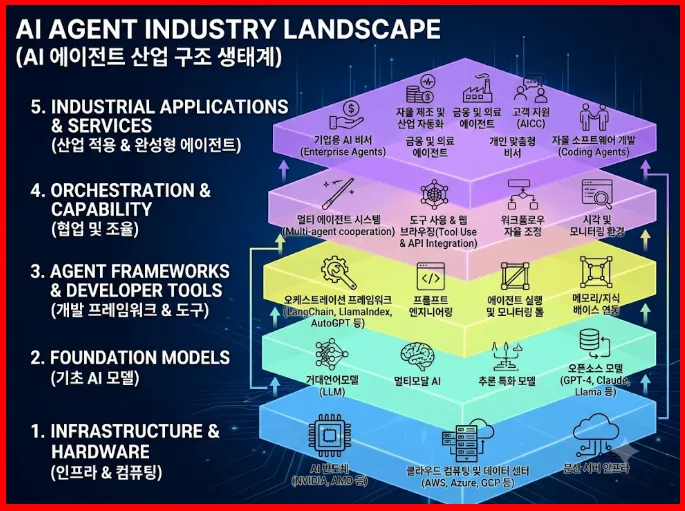
AI agents are systems designed to do more than answer questions: they can carry out multistep tasks.
For example, an agent might review a customer inquiry, search for relevant information, and then draft a response—all as part of a connected workflow.
But there is an important distinction to make.
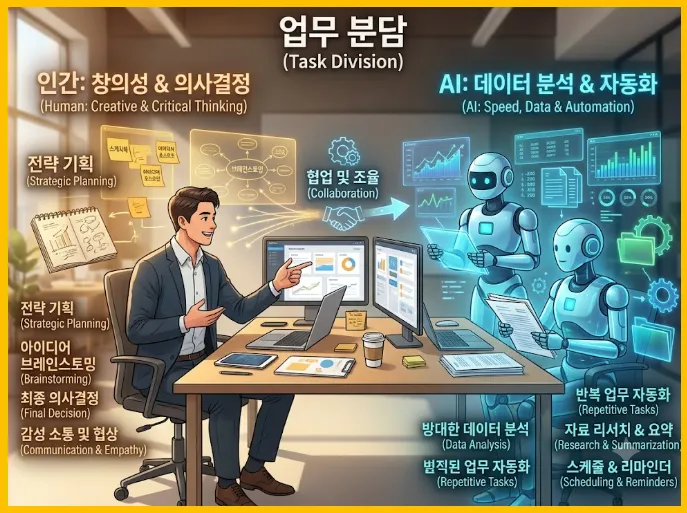
Automating part of someone’s work is not the same as replacing their entire job.
A job involves more than repetitive tasks. It also requires judgment, discussion, problem-solving, and accountability.
The International Labour Organization (ILO) has also highlighted the possibility that generative AI will change the mix of tasks within jobs rather than eliminate entire occupations.
Rather than predicting which jobs will disappear, it is more useful to examine which tasks are changing first.
2. The First Area: Customer Inquiries and Support
Customer service is one of the most common areas where businesses use AI.
Typical examples include inquiries that follow clear rules, such as tracking shipments, checking order status, and explaining basic product or service features.
Companies can use AI agents to categorize customer questions, find the necessary information, or prepare responses.
LangChain’s 2026 survey on AI agents identified customer service as a major use case.
For businesses, the goal is to handle repetitive inquiries more efficiently.
Human involvement remains important, however, when issues require judgment—for example, refund disputes or complicated complaints.
Rather than assuming customer service jobs will disappear, consider how the balance between routine inquiries and complex problem-solving might shift.
3. The Second Area: Organizing Documents and Analyzing Information
Many of us review large amounts of documentation and information every day at work.
That might mean summarizing a meeting or finding common themes across several reports.
These are tasks where AI can provide useful support.
For example, you could ask it to identify major changes in an industry using several public reports and organize the findings into a summary table.
Microsoft’s 2026 report on work trends also shows AI being used across knowledge work, including information analysis, problem-solving, and information retrieval.
Still, AI-generated summaries can leave out important details.
Checking source accuracy and deciding which information to use remain essential steps.
4. The Third Area: Software Development and Error Checking
Software development is a major focus of discussions about adopting AI agents.
AI can help draft code, flag potential errors, and generate test code.
In a survey McKinsey published in August 2026, responding companies identified software development as one of the main areas where they were using AI agents at scale.
In the same survey, 32% of respondents said they had decided against buying certain software products or features because AI coding tools allowed them to develop those capabilities in-house.
This suggests that AI is influencing not just how software gets built, but also how companies decide what to buy.
Generating code, however, does not automatically produce a secure, reliable program.
Design, security, error checking, and maintenance still require developers’ judgment and accountability.
5. The Fourth Area: Creating Marketing Content
AI use is expanding in marketing, too.
Common applications include drafting product descriptions, brainstorming advertising copy, and analyzing customer responses.
When a team needs to describe multiple products in a consistent format, AI can reduce the initial writing workload.
But there is no guarantee that AI-generated copy will capture consumers’ attention or lead to purchases.
Adapting the message to each brand’s voice and audience is especially important.
It is worth distinguishing between helping produce routine content and deciding on a marketing strategy.
Even when AI writes the first draft, someone still needs to approve the final message and evaluate its performance.
6. The Fifth Area: IT Management and Internal Requests
Corporate IT teams handle system errors and employees’ technical support requests.
Typical tasks include explaining how to reset a password, categorizing access requests, and logging support tickets.
AI agents can help categorize requests, search for relevant solutions, or route issues to the right person.
Some manufacturers are also applying AI to inventory management and supply chain tasks.
McKinsey’s 2026 survey likewise identified IT and knowledge management as prominent areas for AI agent adoption.
However, AI systems that directly access company systems need clearly defined permissions.
An incorrect command could expose information or disrupt operations.
Important system changes therefore need approval procedures and records of the actions taken.
7. AI Task Automation: Comparing the Five Areas
|
Work Area |
Example AI Uses |
What People Need to Check |
|---|---|---|
|
Customer Support |
Categorizing inquiries and drafting responses |
Complex complaints and disputes |
|
Document Management |
Summarizing and retrieving information |
Accuracy and context |
|
Software Development |
Writing and testing code |
Design and security |
|
Marketing |
Drafting content and analyzing data |
Strategy and brand fit |
|
IT Management |
Categorizing requests and helping troubleshoot |
Permissions and system safety |
One pattern stands out in this table: many businesses are trying to apply AI to repetitive tasks with clear rules.
Human judgment remains necessary when someone must take responsibility for mistakes or weigh the needs of multiple stakeholders.
Of course, these boundaries may shift as technology advances and companies change how they operate.
8. An AI Readiness Checklist for Employees
□ Have you identified your repetitive tasks? Knowing which tasks consume your time helps you assess what might be worth automating.
□ Do you understand the basic features of AI tools? Understanding a tool’s capabilities helps you match it to the right tasks.
□ Do you check information for accuracy? AI-generated material can contain errors.
□ Can you explain your workflow? Knowing the sequence of steps makes an automated workflow easier to design.
□ Do you understand privacy requirements? Entering company information into an external AI tool can create problems.
□ Can you spot mistakes in AI-generated work? Reviewing results becomes especially important once a process is automated.
□ Can you coordinate work with other people? Discussion and communication play an important role in getting work done.
□ Do you track how long tasks take? You need a baseline to judge whether automation is helping.
□ Are you keeping your professional knowledge up to date? That expertise helps you evaluate whether AI-generated work is appropriate.
□ Do you test new tools on small tasks? Small experiments let you assess practical value before making a major investment.
9. A Simple AI Task Automation Experiment to Try
This article is not a firsthand account of implementing AI automation at a particular company.
It is an informational overview based on published surveys, with practical approaches individuals can try.
If you are just getting started, it is safer to use public information or documents you have written for personal use rather than important company materials.
Step 1. Choose one task you do repeatedly.
Step 2. Measure how long it takes without AI.
Step 3. Use AI to produce a first draft of the same work.
Step 4. Check its accuracy and track the time needed for revisions.
Step 5. Compare the total time and decide whether using AI is worthwhile.
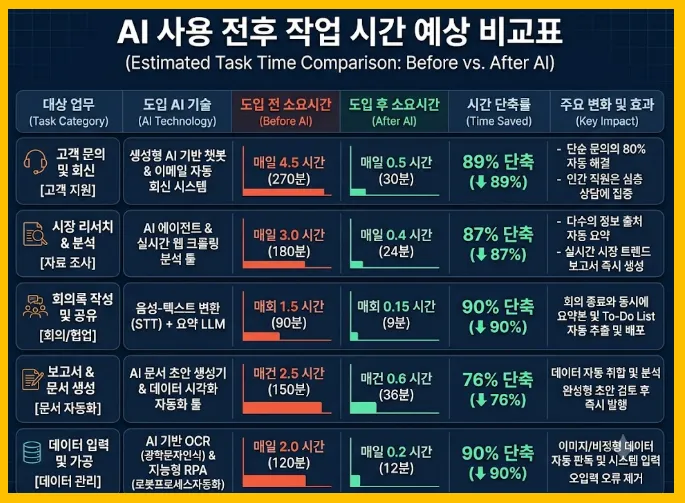
Suppose it takes you 40 minutes to summarize three publicly available industry news articles.
If AI helps you produce a draft in 20 minutes, but reviewing it takes another 15 minutes, your actual time savings amount to just 5 minutes.
And if AI leaves out important information, a faster turnaround alone does not make the automation successful.
What matters is not simply whether you used AI, but whether it actually improved the quality and efficiency of your work.
10. Five Mistakes to Avoid When Assessing AI’s Impact on Jobs
First, confusing AI adoption rates with job-loss rates.
An increase in the share of companies using AI does not mean employment will fall by the same percentage.
Second, treating jobs and tasks as the same thing.
A single job can include both tasks that are easy to automate and tasks that are difficult to automate.
Third, failing to review AI-generated results.
Even a polished, natural-sounding response can be factually wrong.
Fourth, entering personal information and company secrets without proper care.
Check your company’s policies and the tool’s data-handling terms first.
Fifth, assuming that knowing how to use AI guarantees job security.
Technical skills can help, but employment also depends on industry conditions, business decisions, and many other factors.
Frequently Asked Questions
Q1. Will AI agents eliminate jobs?
Some tasks and employment structures may change, but that does not mean every occupation will be replaced.
Q2. Which tasks are being automated first?
Highly repetitive tasks with clear rules, such as document processing and categorizing customer inquiries, are common targets.
Q3. Will office workers be affected, too?
Yes. AI can affect some office tasks, including writing documents and analyzing information.
Q4. Will learning AI help me get a job?
AI skills relevant to your role can be useful, but they do not guarantee employment.
Q5. Where should a beginner start?
Break your current work into individual tasks, then try a simple experiment using AI.
Final Thoughts: Look at Tasks Before Jobs in the AI Era
AI agents could change the way we work.
But a technology’s ability to perform a particular task does not, by itself, mean an entire occupation will disappear.
Companies are using AI to improve efficiency across customer inquiries, information organization, software development, marketing, IT management, and other areas.
If you are an employee or job seeker trying to understand these changes, start by breaking your role into individual tasks.
Treat sweeping predictions that AI will soon replace every job with caution.
Next time, we will look at how to calculate the costs and time savings involved in applying AI automation tools to real work.
Three Key Takeaways
AI agents are being used in customer support, document organization, development, marketing, and IT management.
Automating part of a job does not necessarily eliminate the entire role.
Alongside AI skills, the ability to verify results and exercise judgment may become increasingly important.
#AIAgents #AIWorkAutomation #AIAndJobs #ArtificialIntelligence #FutureCareers #AIForEmployees #HowToUseAI #GenerativeAI #WorkplaceEfficiency #FutureIndustries #AIIndustryOutlook #AutomationTechnology #ProfessionalDevelopment #AIEra #FutureJobs #UnderstandingTheEconomy